

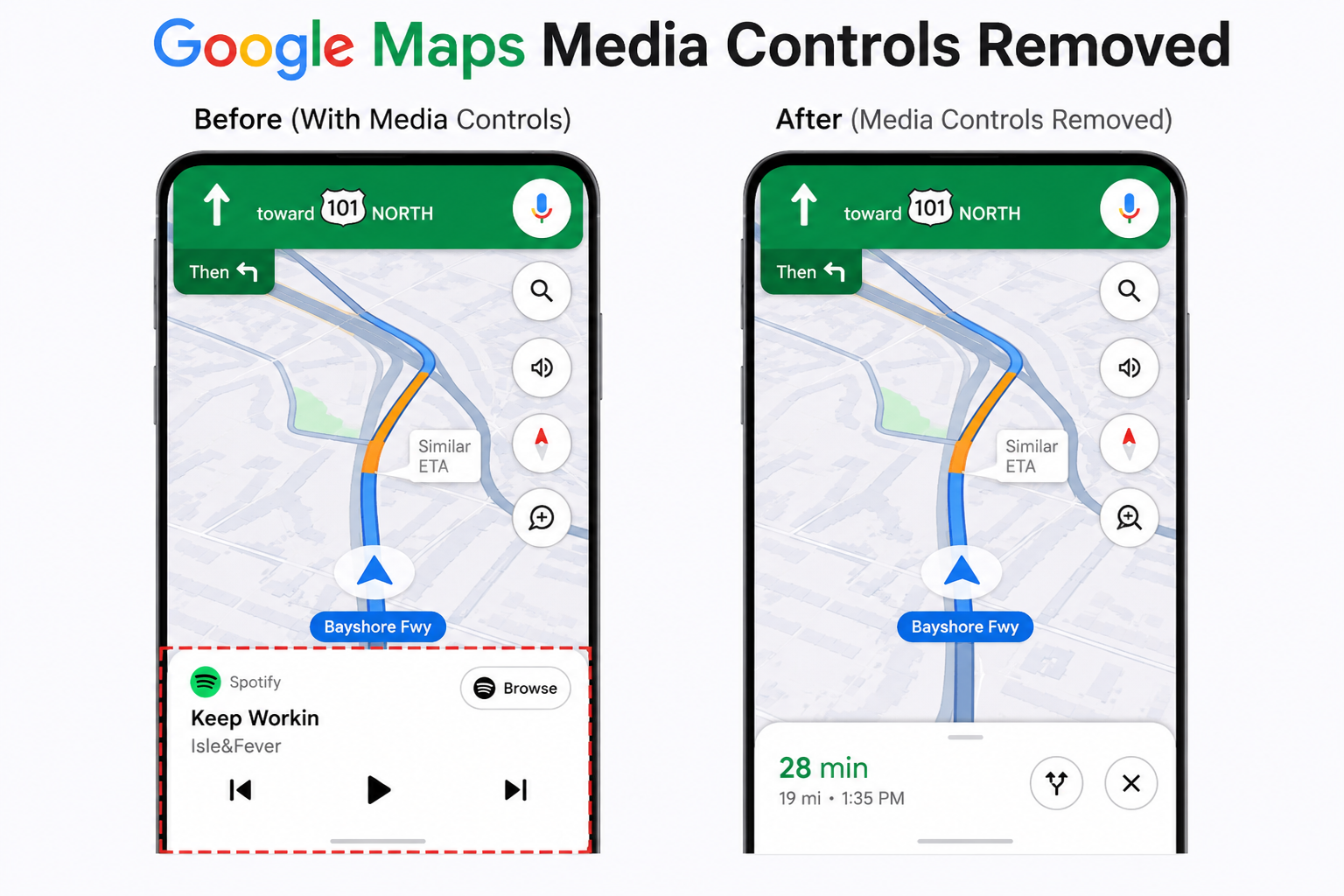
In early 2026, Google made a significant change to one of its most widely used navigation platforms: Google Maps media controls removed from the in‑app interface. This update ignited reactions from millions of users, developers, and automotive partners who rely on seamless media management while navigating. The removal of media controls in Google Maps represents not just a cosmetic shift but a broader trend in how platforms balance user experience, safety, and ecosystem stability. This article explores everything about this change: why it happened, how it impacts users and developers, what alternatives exist, and how the future of in‑app media control might evolve.
What Exactly Happened: The Removal of Media Controls from Google Maps
In March 2026, Google rolled out an update that permanently disabled media playback controls (play, pause, skip) embedded directly within the Google Maps application interface. Historically, users could control music, podcasts, and audio apps directly from the Google Maps screen, allowing drivers to adjust playback without switching between apps. With this change, those convenience features were removed, and users noticed blank placeholders where media controls once lived.
Google officially cited a need for simplification and focus on core navigation functions, but the move was controversial. Many users who had become accustomed to having a single interface for both directions and media found themselves frustrated. The abrupt nature of the change, combined with limited prior communication, left many unanswered questions — most importantly: why would Google remove something so heavily used in daily commutes and road trips?
Why Google Decided to Remove Media Controls
Understanding why the Google Maps media controls were removed involves multiple layers of strategic decision‑making at Google. There are several key reasons analysts and insiders believe drove the decision:
1. Focus on Core Navigation Safety
Google stated that media controls can distract drivers from the primary function of Maps: safe navigation. With more people using Maps for complex routing, transit directions, and location discovery, the company may have felt that consolidating focus on navigation and location intelligence would reduce cognitive load for users.
2. Reducing App Complexity
Maps has grown into a feature‑rich platform with layers for transit, biking, driving, local business suggestions, street view, and more. Each added feature increases app complexity and maintenance costs. Removing media controls simplified the user interface and reduced a set of features Google engineers must constantly update across Android, iOS, and automotive platforms.
3. Partnerships with Automotive OS Platforms
Platforms like Android Auto and Apple CarPlay now provide their own robust media control integration. Google may view in‑app controls as redundant — especially when a connected car infotainment system already manages media playback more safely through hardware buttons and UI optimized for distraction‑free use.
4. Technical and Licensing Constraints
Media playback involves partnerships with third‑party streaming services. Negotiating or maintaining permissions for direct control within Maps might have posed costs or legal complexity that Google decided weren’t justifiable in the long term.
While Google did offer some general reasoning, many users still feel the Google Maps media controls removed without adequate alternative solutions.
How Users Are Reacting to the Change
When a change affects millions of daily users, feedback tends to be passionate — and the reaction to the removal of media controls in Google Maps was no exception. Across social media platforms, forums, and user groups, people have shared their perspectives.
1. Frustration from Daily Commuters
Many commuters rely on listening to music, podcasts, or audiobooks during daily drives. The removal meant an extra step: switching out of Maps to a separate media app when they wanted to change playback. Users cited that this increased distraction — ironically, the opposite of Google’s stated safety reasoning.
2. Users with Disabilities Express Concern
For some users with motor limitations, accessing media controls through Maps made managing audio easier. The removal adds complexity: now users must navigate between apps or rely on voice commands more consistently.
3. Developers and Tech Communities Debate Rationale
Tech forums have discussed whether Google prioritized aesthetic simplification over functional usability. Some see the move as part of a larger trend where big tech companies trim feature overlap across products.
4. Support for Alternatives
There is also a segment of users who support the change, especially drivers with cars equipped with integrated media control systems (Android Auto, Apple CarPlay). These users argue the in‑app controls were redundant and that their native systems offer better safety and convenience.
The diversity of reactions underscores a central truth: the impact of removing media controls from Google Maps varies widely based on individual user needs, device setups, and driving habits.
Impact on Navigation Safety: Helpful or Hindrance?
At the heart of Google’s reasoning was driver safety. Let’s examine whether the removal of media controls from Google Maps actually contributes to safer navigation.
Arguments Supporting Safety
- Less Cognitive Load: Driving requires constant attention. Reducing interactive elements on a primary navigation interface could, in theory, help users focus solely on directions.
- Reduced Touch Interactions: Eliminating buttons for controlling playback might reduce the number of times a driver’s eyes and attention shift from the road.
Counterarguments
- Switching Between Apps Can Be Riskier: For many users, switching from Maps to a music app requires more attention than using a dedicated control integrated in the navigation UI. This interruption can momentarily blur focus, especially in heavy traffic.
- Voice Control Limitations: Relying on voice assistants like Google Assistant for media control can be inconsistent, especially in noisy environments, limited network conditions, or when pronunciation isn’t perfectly understood.
Research and Data Needs
At the time of writing, there is no conclusive, large‑scale study linking the removal of in‑app media controls with measurable improvements in driver safety. While Google’s reasoning is plausible, many user experiences suggest the issue is more nuanced.
Effects on Third‑Party Apps and Integration Ecosystem
The Google Maps media controls removed impacts more than just UI convenience — it affects the app ecosystem at large.
1. Streaming Services Lose a Control Point
Applications like Spotify, YouTube Music, Audible, and podcast players previously benefited from built‑in controls in Maps. Users could skip tracks or pause playlists without leaving directions. Now, these apps must rely on their own interfaces or OS‑level integrations.
2. App Developers Must Adapt
Developers of media and navigation apps must rethink how they provide cross‑app functionality. Some may need to prioritize seamless switching or deeper integration with voice assistants.
3. Automotive Industry Shifts
Car manufacturers and infotainment system developers may see this as an opportunity to reinforce reliance on native media integrations — reducing dependency on mobile apps for core media control.
4. Ecosystem Fragmentation Risk
When one platform removes a widely adopted feature, different apps and systems may fill the gap in inconsistent ways. This could lead to fragmented user experiences across devices and brands.
Overall, the removal of media controls from Google Maps has created ripples that extend far beyond the Maps interface — touching developer strategies, partner integrations, and user expectations.
Alternatives to In‑App Media Controls After the Change
If you’re one of the many users affected by the Google Maps media controls removed, it’s important to know what alternatives exist to manage media playback seamlessly.
1. Use Android Auto or Apple CarPlay
These systems provide robust media control integration that works in tandem with navigation. They are designed for minimal distraction, with large buttons and steering wheel controls.
2. Voice Assistant Commands
Google Assistant can manage playback controls via voice commands, such as:
- “Hey Google, play my workout playlist.”
- “Pause music.”
- “Skip this song.”
While not perfect, this helps reduce reliance on touch interactions.
3. Lock Screen Controls
On most smartphones, media playback controls appear on the lock screen or in the notification shade. Users can manage audio without fully unlocking the phone or switching apps manually.
4. Dedicated Wearables
Smartwatches and wearable devices can provide convenient playback controls that don’t require looking at a screen. These devices can be safer for changing tracks while driving (using haptic feedback and simple taps).
5. Car Infotainment System Buttons
Many vehicles offer physical buttons on the steering wheel or dashboard that control media apps running on connected phones. Using these can be safer than interacting with the phone itself.
Though these alternatives exist, none offer the same integrated, all‑in‑one experience that Maps once provided — which is a major reason why users are disappointed by the removal of media controls from Google Maps.
Developer Perspective: What This Means for App Creators
From an app developer’s standpoint, Google’s move has broader implications:
1. Less Cross‑App Control
Developers can no longer rely on Google Maps to act as a unified media playback interface. This means:
- Redesigning app flows to accommodate switching.
- Prioritizing independent media control interfaces.
2. Opportunity to Innovate
Some developers see this change not as a loss but as an opportunity:
- Creating dedicated navigation‑plus‑media apps.
- Building smarter voice‑controlled interfaces.
- Integrating more deeply with automotive ecosystems.
3. Fragmented Behavior Across Platforms
Developers must now accommodate varying user habits:
- iOS and Android handle media integration differently.
- Android Auto and CarPlay offer alternative APIs.
This adds complexity but also encourages better adherence to platform‑native design principles.
4. Emphasis on Safety Compliance
With increasing regulation around distracted driving interfaces, developers must be careful about how media controls are presented. Google’s shift may signal an industry trend toward stricter UI limitations for navigation apps.
Developers adapting to this new reality will likely shape the next generation of media and navigation experiences.
Future Possibilities: What Could Replace or Improve Media Management in Navigation?
The removal of media controls from Google Maps doesn’t mean the end of innovation in this space. Several trends suggest how media navigation might evolve:
1. Smarter Voice Interactions
Voice AI is improving rapidly. Future voice systems could intuitively recognize intent without explicit commands — for example, detecting a driver’s desire to switch playlists based on context.
2. Context‑Aware Dashboards
Future navigation apps might offer simplified dashboards that adjust contextually — showing only essential buttons at moments of low driving demand.
3. Consolidated OS Features
Operating systems might take over media/navigation integration more effectively, offering seamless control without app overlap.
4. Augmented Reality HUDs
Heads‑up displays with AR overlays could present media controls with minimal distraction, floating above navigation lanes or alongside directions.
5. Personalized Adaptive UIs
AI‑based interfaces that learn user behavior over time, automatically showing controls based on usage patterns rather than always displaying them.
Each of these innovations could address frustrations caused by the Google Maps media controls removed, but they require investment, hardware evolution, and widespread adoption.
Conclusion: A Change That Matters More Than It Seems
The Google Maps media controls removed update is more than just a button deletion — it reflects how tech platforms balance safety, simplicity, ecosystem complexity, and user expectations in a world where mobile apps perform multiple tasks. While Google’s rationale centers on safety and focus, the real‑world impact reveals trade‑offs that matter deeply to everyday users, developers, and partners across the tech landscape.
Whether you are a daily commuter, a developer, or someone who simply loves convenience, this change invites broader thinking about how we interact with the tools that guide us, entertain us, and shape our digital lives.
With new alternatives emerging and innovation accelerating, the removal marks not an end but a transition — one that may ultimately inspire better, smarter, and safer media experiences tied to navigation in the years ahead.